Guide
Launch an API from the dashboard
You already have an API. Autonomo puts a gateway in front of it: agents call the gateway, pay per call in USDG or $AUTONOMO on Robinhood Chain, and the gateway forwards each paid request to your API. You don't change your code, and launching is free.
Before you start
- An API that's public and uses
https, with a base URL likehttps://api.example.com/v1. No query string, and it must not redirect. - If your API needs a key, have the header name (for example
X-API-Key) and the key ready. - An email address, a Google or X account, or a wallet to sign in with. If you don't have a wallet, one is created for your earnings.
- A price in mind. The official Autonomo APIs charge 0.01 USDG per call, for comparison.
Launch it
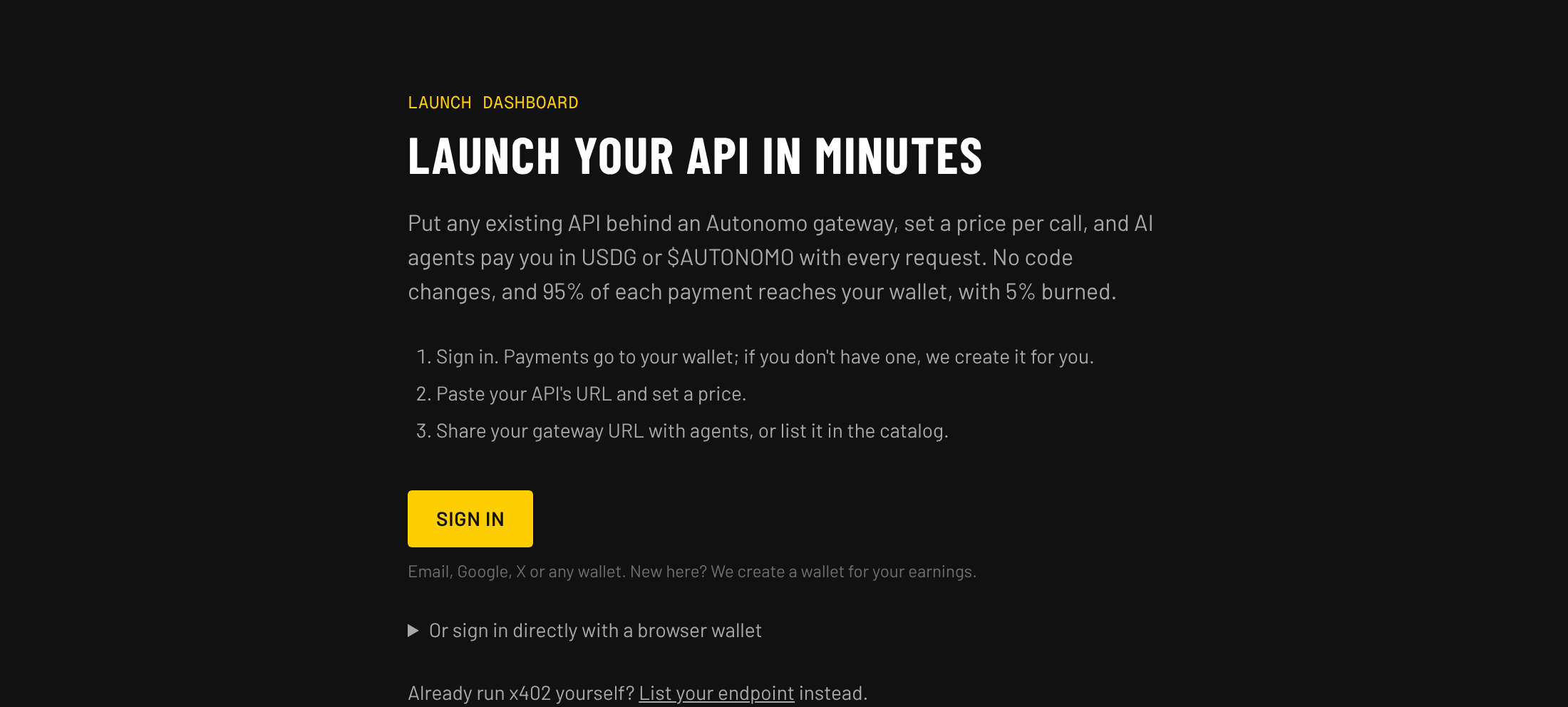
01Sign in to the dashboard
Open the dashboard and sign in with email, Google, X or a wallet. You can also sign in directly with a browser wallet. Your APIs get paid at the wallet you sign in with, so keep using the same one.
02Choose Launch an API
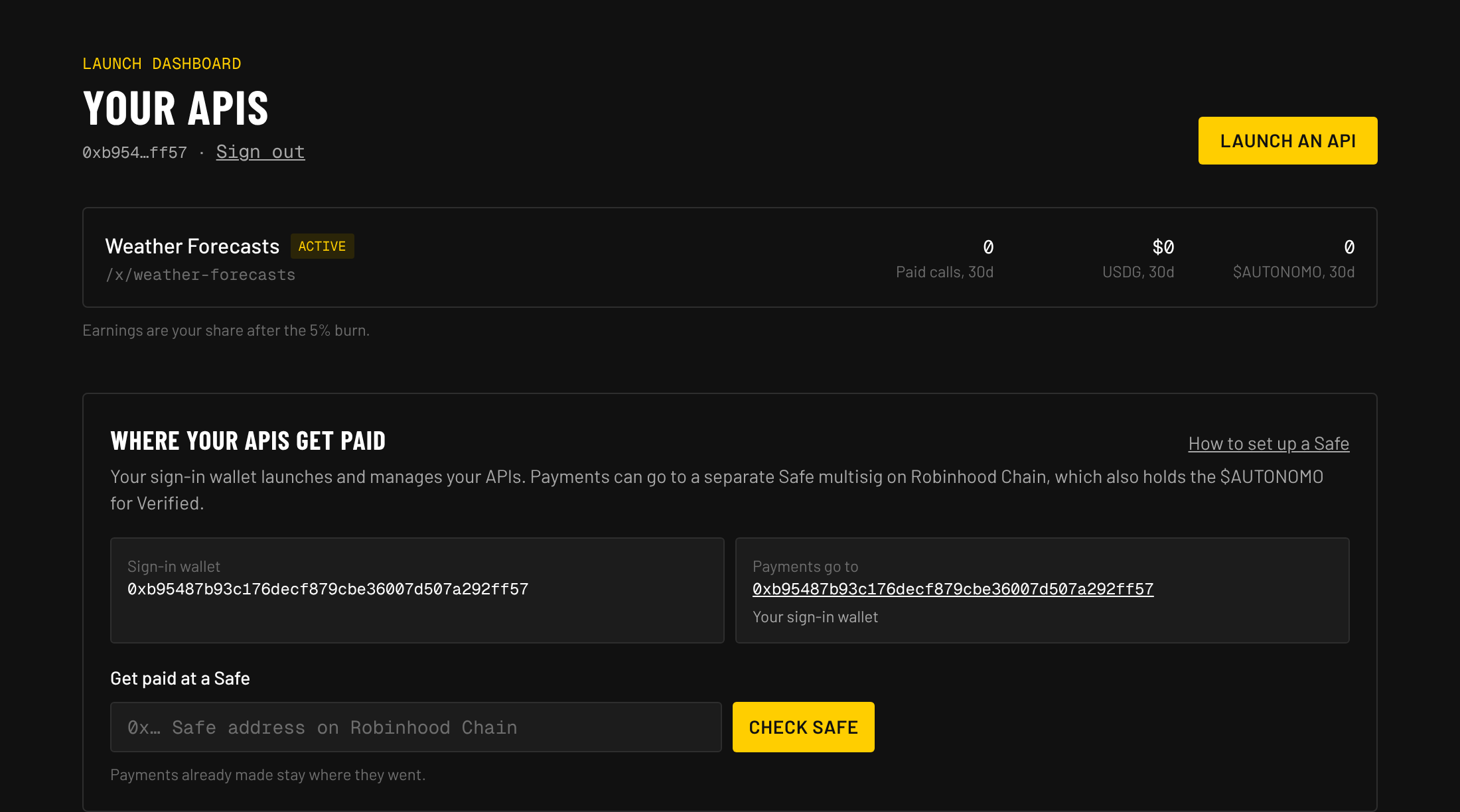
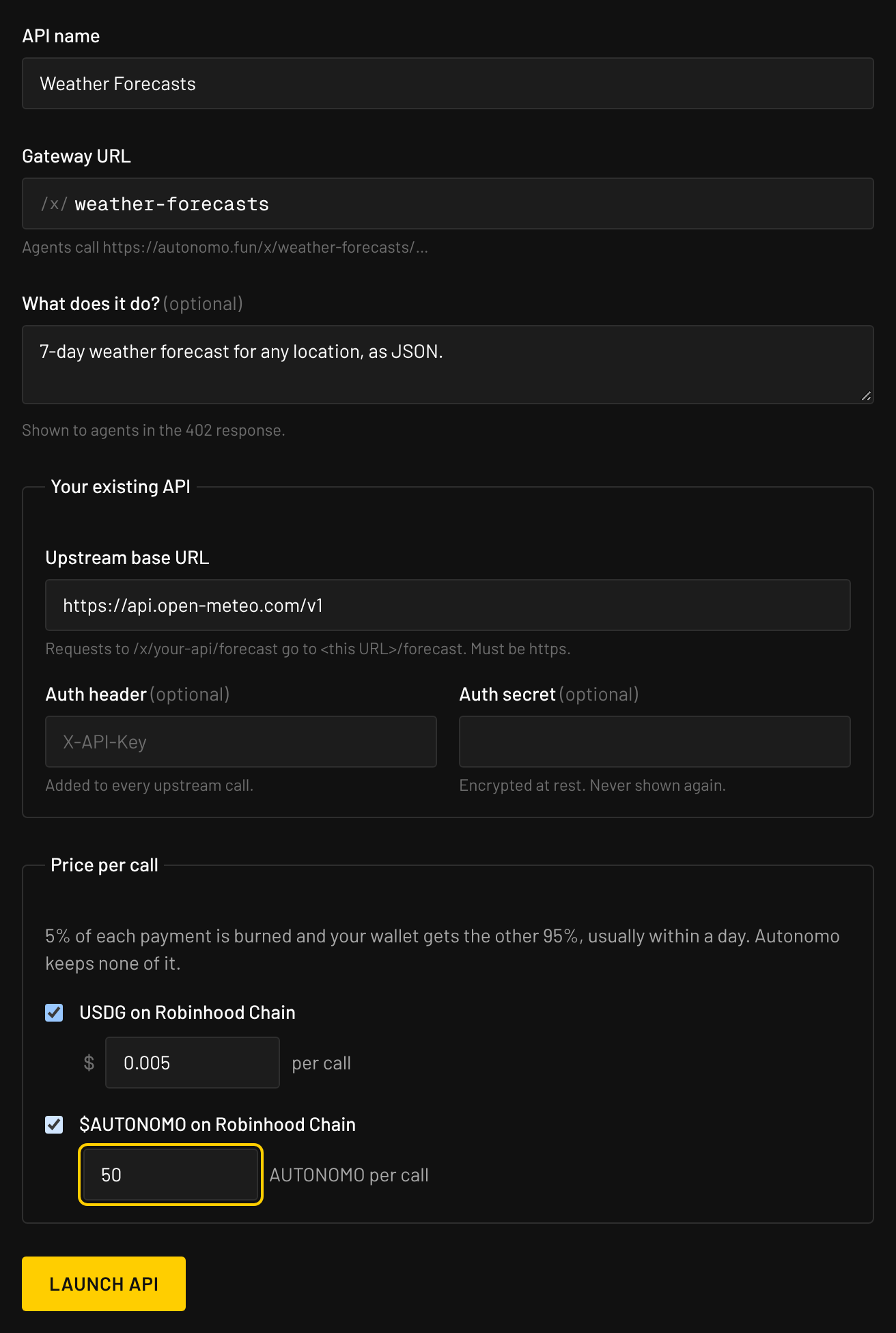
Choose Launch an API at the top of the dashboard. The form has three parts: about your API, your existing API, and the price per call.
03Name it and pick its gateway URL
- API name: what people and agents see, for example Weather Forecasts.
- Gateway URL: filled in from the name, and you can change it: 3 to 40 lowercase letters, numbers or dashes. Agents call
autonomo.fun/x/your-api/…, and it can't be one that's already taken. - What does it do? One or two plain sentences. Agents read this in the payment answer to decide whether to pay, so say what comes back, such as “7-day forecast for any city, as JSON.”
04Connect your existing API
- Upstream base URL: where paid requests go. A call to
/x/your-api/forecast?city=Lisbonis forwarded to<your base URL>/forecast?city=Lisbon, with the same method and body. - Auth header and Auth secret (optional): if your API needs a key, enter the header name and the key. The key is encrypted, added to every forwarded call and never shown again, so agents never see it.
When you save, Autonomo checks the URL is https and reaches a public address.
05Set the price per call
- USDG: a price in dollars, from $0.000001 to $100 per call. USDG payments are one signature for the agent.
- $AUTONOMO: tick it and enter how many tokens per call. Agents approve Permit2 once before their first $AUTONOMO payment.
Accept one or both. Accepting both lets more agents pay you. 5% of each payment is burned and you get the other 95%. Autonomo keeps none of it.
06Choose Launch API
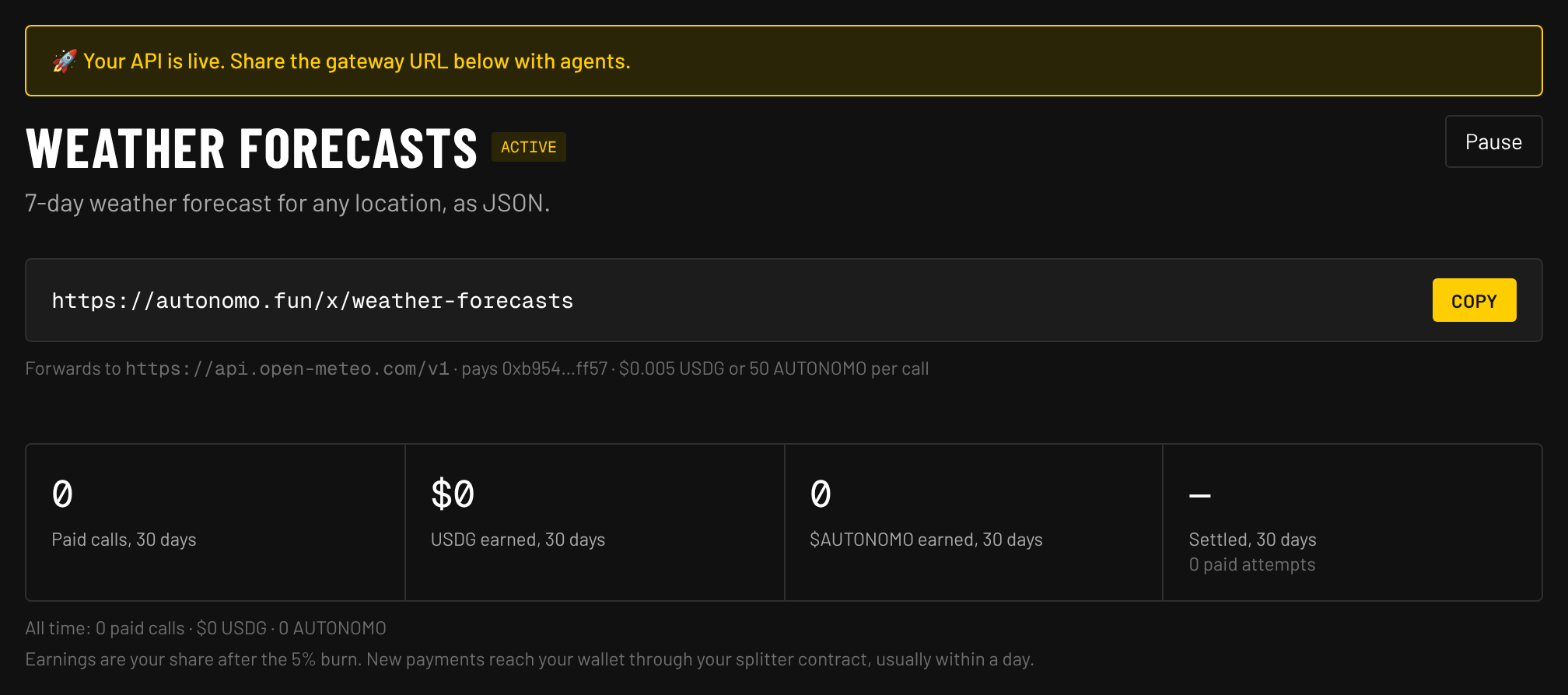
It takes a few seconds while the URL is checked. Then you land on your API's page with “Your API is live” and its gateway URL, ready to copy. If something needs fixing, the form says what next to the field.
Check that it works
07See the price
Call your gateway without paying. It should answer 402 Payment Required with your price:
curl -i https://autonomo.fun/x/your-api/
The same command, with your gateway URL, is under Try it on your API's page. Add the path your API expects after the slash.

08Make a paid call
Pay for one call with any x402 client, such as the example in Pay from your own code or the MCP server. It appears under Recent payments on your API's page with the payer, what you earned and a link to the transaction.
A payment only settles when your API answers successfully, with a status below 400. If your API fails, the agent isn't charged, and the call shows as not settled on your chart.
Get listed
09Request a listing
Your gateway works as soon as it's launched, but only people you give the URL to can find it. To be found, choose Request listing under Catalog listing on your API's page. Once approved, it gets a project page in the directory and appears in /api/v1/gateways, which agents and the Autonomo MCP server search.
10Wait for review
Listings are reviewed by hand. The box on your API's page shows where it's at:
- Waiting for review: your request is in the queue.
- Listed: agents can now find your API.
- Not approved: update the name, description or API, then request again.
What helps: a working API, a clear name, and a description that says exactly what an agent gets for its payment.
Getting paid
- Payments are settled by the burn splitter contract: every paid call goes to your own splitter, which sends 95% to your wallet and burns 5%, usually within a day. Your dashboard shows your share. Autonomo settles every payment on Robinhood Chain itself and pays the gas.
- Your API's page shows paid calls, USDG and $AUTONOMO earned over 30 days and all time, how many paid attempts settled, a 14-day chart and every recent payment.
- Want your earnings in a multisig? See Get paid at a Safe.
- Hold about $27 of $AUTONOMO in the wallet your APIs pay and they show a Verified badge. The tokens stay yours. More on Verified.
How the 5% burn works
- Agents pay your own splitter contract, not your wallet directly. Nobody can take money out of it except by splitting it the fixed way, and the 5% rate can't be changed.
- When it splits, 95% goes to your wallet. Of the rest, $AUTONOMO is burned straight away, and USDG goes to a buyback contract that buys $AUTONOMO with it and burns that.
- It splits as soon as a payment takes it to 1,000 $AUTONOMO or 0.10 USDG, and a daily run also splits anything from 100 $AUTONOMO. Less than 0.10 USDG waits until more payments arrive.
- Every burn is public: see the burn page for each receipt, and the full details for the contract addresses.
Managing your API
- Edit: change the name, description, upstream, key or price under Settings on your API's page. Changes apply to the very next call. Leave the secret blank to keep the saved one.
- Pause: choose Pause and the gateway answers
503without charging anyone, until you choose Resume. - Delete: type the gateway name to confirm. The gateway URL stops working at once.
Limits
- Requests up to 1 MB and responses up to 5 MB.
- Your API has 25 seconds to answer.
- GET, POST, PUT, PATCH and DELETE are forwarded. Redirects aren't followed.
- Your API must stay on https and resolve to a public address. This is checked on every call.
Questions
- Does launching cost anything?
- No. Launching a gateway and getting listed are free.
- Do I need to change my API?
- No. Agents pay the gateway, and your API receives normal requests with your key added. It never handles payments.
- Can I launch more than one API?
- Yes. Each gets its own gateway URL, price and page, and they all show on your dashboard.
- I already run x402 on my own server. Is this for me?
- You don't need a gateway. Request a listing through the launch form instead.